

What does TexaCore offer for Exchange & remittances?
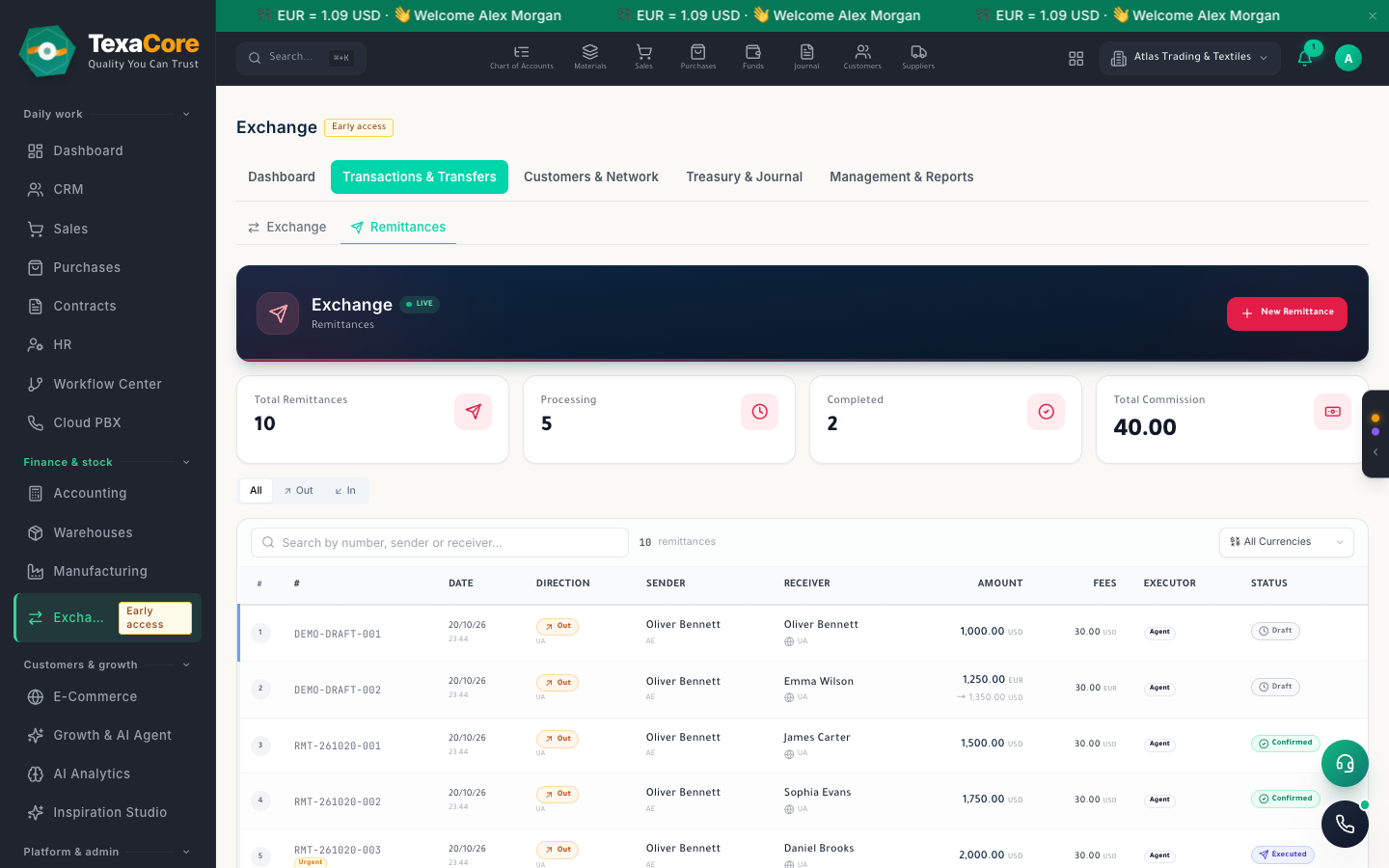
Run outgoing and incoming remittances through your agents and partners, with a ledger account for every customer, agent and partner and an accounting entry for each transfer.
Run outgoing and incoming remittances through your agents and partners, with a ledger account for every customer, agent and partner and an accounting entry for each transfer.
A buy and a sell rate per currency with a margin. The transfer form converts at the saved rate and records your fee and the agent's fee.
A transfer moves from draft to confirmed, executed, delivered and completed. Its accounting entry is posted, and reversed if you cancel it.
Record a transfer arriving from an agent or partner, confirm its receipt, then pay the receiver from the cash fund you choose, with your commission booked.
Each customer gets a ledger sub-account that you find or add while writing a transfer, and the customer list shows their balances.
A transfer moves from draft to confirmed, executed, delivered and completed. Its accounting entry is posted, and reversed if you cancel it.
Record a transfer arriving from an agent or partner, confirm its receipt, then pay the receiver from the cash fund you choose, with your commission booked.
Every status change is logged in a per-transfer timeline with notes, and staff can get Telegram alerts through your own bot.
Each agent and correspondent partner has its own ledger account, commission rate and currencies. The agent list shows balance, last transfer and totals.
Each customer gets a ledger sub-account that you find or add while writing a transfer, and the customer list shows their balances.
A buy and a sell rate per currency with a margin. The transfer form converts at the saved rate and records your fee and the agent's fee.
A list of cash and bank accounts with their currency and balance, and totals converted to the display currency you choose.
Store IDs, passports, residence and trade documents for each customer, agent or partner, with expiry warnings and file attachments. It records documents; it does not verify anyone's identity.
The Exchange & remittances module is a specialized module: the pricing page shows which plans include it. It covers remittances and their accounting entries; it does not include a counter screen for buying and selling currency. In the app it is marked early access: some features are still being built.
Tools built for this industry, together with strengths that run across the whole platform.
A transfer moves from draft to confirmed, executed, delivered and completed. Its accounting entry is posted, and reversed if you cancel it.
Record a transfer arriving from an agent or partner, confirm its receipt, then pay the receiver from the cash fund you choose, with your commission booked.
Each agent and correspondent partner has its own ledger account, commission rate and currencies. The agent list shows balance, last transfer and totals.
Store IDs, passports, residence and trade documents for each customer, agent or partner, with expiry warnings and file attachments. It records documents; it does not verify anyone's identity.
Every status change is logged in a per-transfer timeline with notes, and staff can get Telegram alerts through your own bot.
Record in any currency, keep each line's original amount, and see the trial balance and statements in the currency you pick.
Print templates with PDF and Excel export, document links by WhatsApp, Viber, Telegram or email, and statement links your customers can agree to.
Start a 30-day cloud trial, or install the desktop edition — it keeps working without internet and is free forever for one user and one company (within the free plan's usage limits).
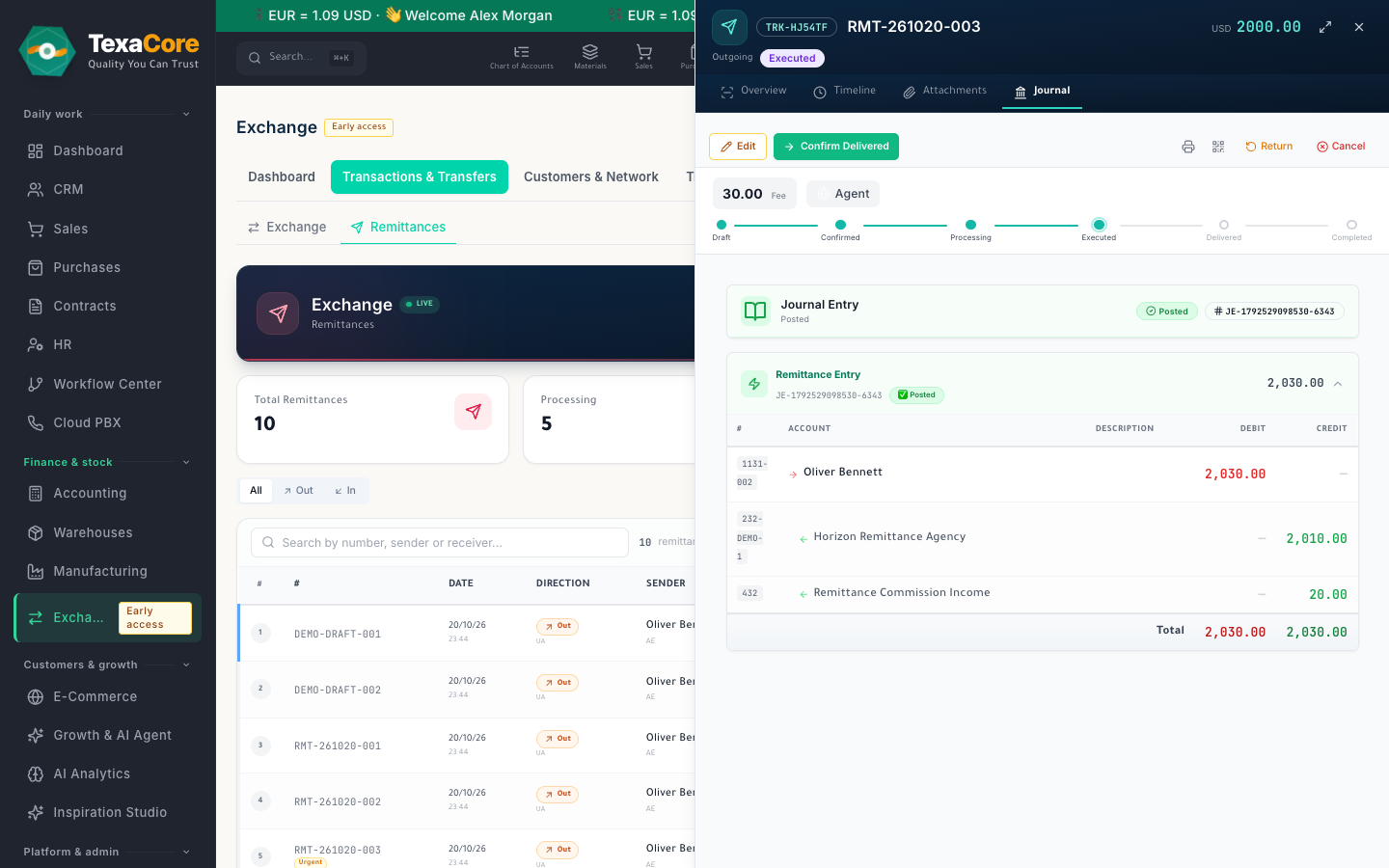
Run outgoing and incoming remittances through your agents and partners, with a ledger account for every customer, agent and partner and an accounting entry for each transfer.
Exchange houses and money-transfer offices that send and receive transfers through agents and partners; Offices that keep a ledger account per customer, agent and partner and want every transfer posted to the books; Finance staff who want each transfer traced from draft to delivery, with its accounting entry
Outgoing remittances, step by step; Incoming remittances and payout; Agent and partner accounts; A ledger account for every customer; Identity documents and expiry warnings; Exchange rates and fees; Tracking timeline and Telegram alerts; Cash and bank balances
The Exchange & remittances module is a specialized module: the pricing page shows which plans include it. It covers remittances and their accounting entries; it does not include a counter screen for buying and selling currency. In the app it is marked early access: some features are still being built.
Yes. The desktop edition works on your own computer while offline. The web edition and cloud services require an internet connection.
Free forever applies to the desktop edition. See the current subscription catalogue for cloud pricing, trial terms, and limits.
Chart of accounts, entries, vouchers and live statements in several currencies, with year-end close.
Explore the moduleTemplates for every document, PDF and Excel export, sharing by WhatsApp, Viber, Telegram and email, and a statement link to confirm.
Explore the moduleReview accounting, sales, inventory, manufacturing, and HR reports from app data, with export options that vary by report.
Explore the moduleA free 30-day cloud trial, or the free desktop edition. And you can move from your current system easily.