
What does TexaCore offer for General Trading?
From quotation to invoice and collection, and from purchase request to goods receipt and posting, on one sheet with barcodes, packaging units, price lists and approval rules.
From quotation to invoice and collection, and from purchase request to goods receipt and posting, on one sheet with barcodes, packaging units, price lists and approval rules.
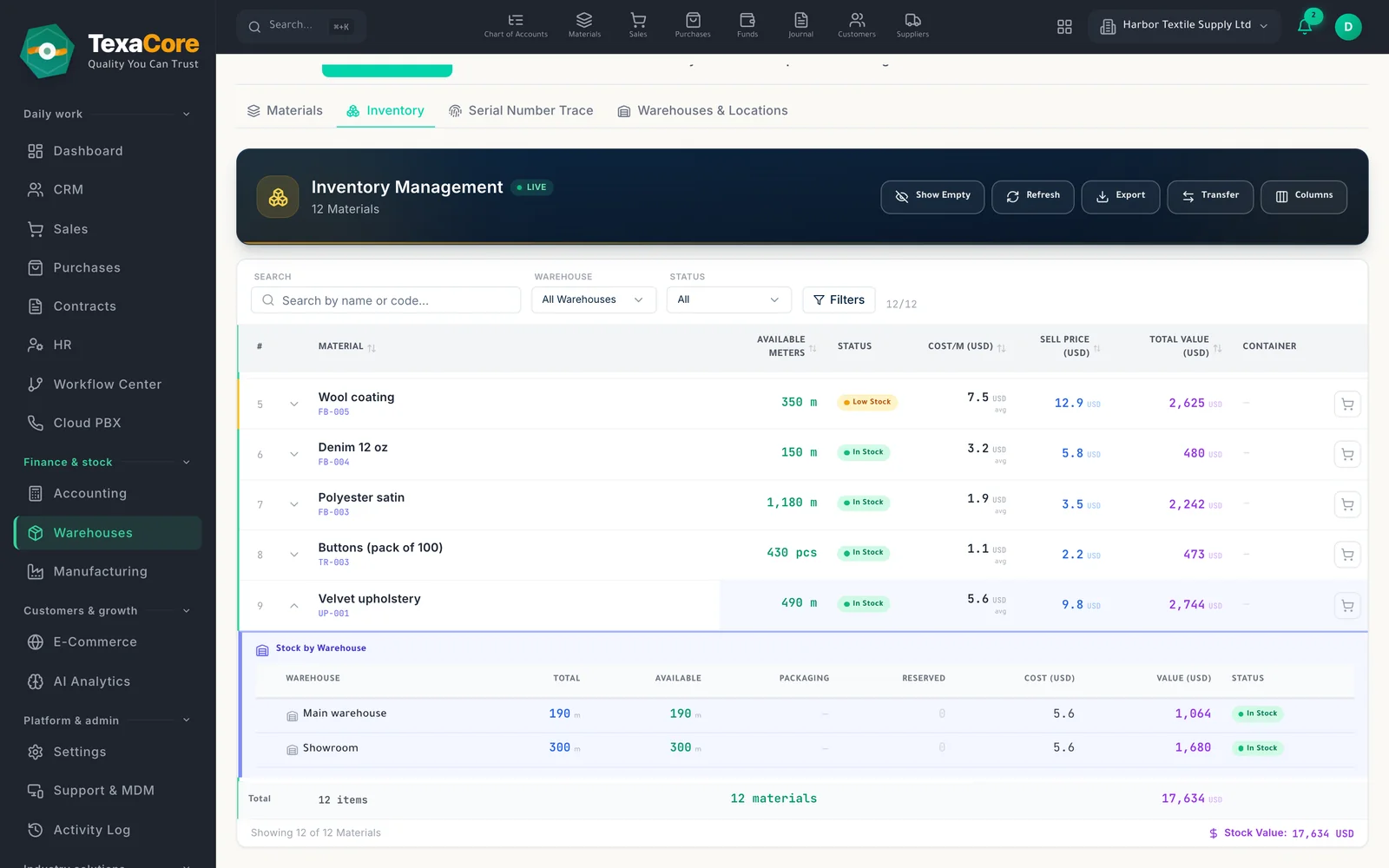
Define warehouses by type (main, branch, store, van and more) and split them into row, column and shelf bins, with an occupancy map.
Sell and buy in boxes, cartons or pallets defined on the item; a scan field adds lines by item, packaging or roll barcode.
Quotation, order and invoice share one lines grid and stage strip, with VAT and notes per document, and the cycle can be viewed as a list or a board.
Collect a payment or the full balance from the invoice; a confirmed receipt moves the invoice to partly paid or paid.
Quotation, order and invoice share one lines grid and stage strip, with VAT and notes per document, and the cycle can be viewed as a list or a board.
A customer's price comes from their own list, then their group's list, the default list, then the item price; discount and credit limit cascade the same way.
Collect a payment or the full balance from the invoice; a confirmed receipt moves the invoice to partly paid or paid.
View opportunities on a Kanban board or list, and change their status and owner. Rename status groups and add company-specific statuses; some document stages follow the sales cycle's rules.
Define warehouses by type (main, branch, store, van and more) and split them into row, column and shelf bins, with an occupancy map.
Sell and buy in boxes, cartons or pallets defined on the item; a scan field adds lines by item, packaging or roll barcode.
Track containers from order to receipt, add estimated and actual expenses, and spread them over the goods by value.
Create a delivery note from an order, independent of the invoice, and deliver the order in several parts.
Record documents and entries in more than one currency; the company keeps one base currency, and reports can also be shown in a second presentation currency.
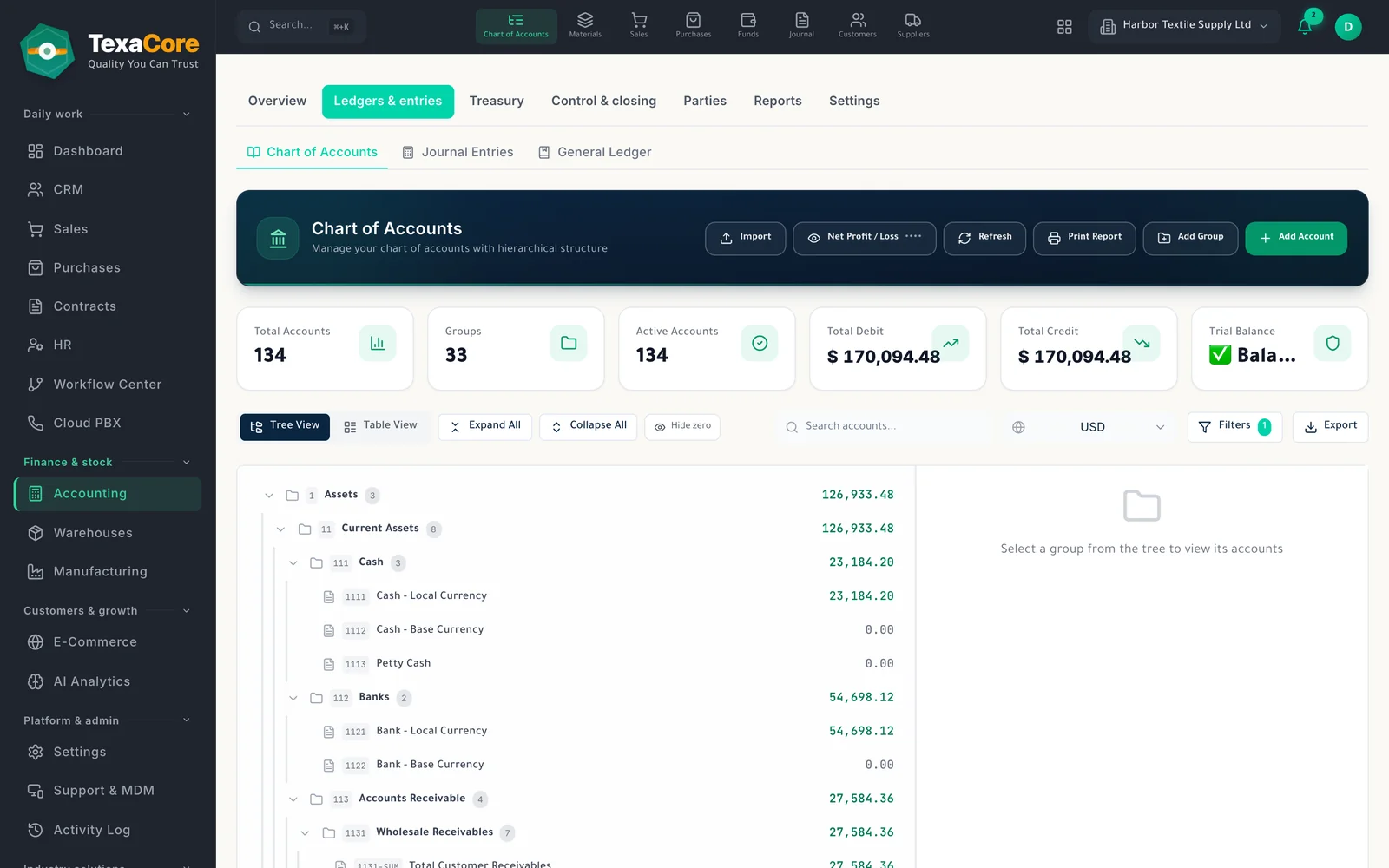
Browse accounts as a tree or table with codes and balances; start from a standard or extended template, or import your own chart.
Tools built for this industry, together with strengths that run across the whole platform.
Quotation, order and invoice share one lines grid and stage strip, with VAT and notes per document, and the cycle can be viewed as a list or a board.
Track containers from order to receipt, add estimated and actual expenses, and spread them over the goods by value.
Create a delivery note from an order, independent of the invoice, and deliver the order in several parts.
Sell and buy in boxes, cartons or pallets defined on the item; a scan field adds lines by item, packaging or roll barcode.
Record in any currency, keep each line's original amount, and see the trial balance and statements in the currency you pick.
Choose when sales and purchase documents need approval: always, above an amount or discount, or when the customer exceeds the credit limit. The server enforces it, and approvers cannot approve their own document (the owner excepted).
Start a 30-day cloud trial, or install the desktop edition — it keeps working without internet and is free forever for one user and one company (within the free plan's usage limits).
Open your Rashid file directly or import from Excel/CSV, with ready templates and column mapping.
From quotation to invoice and collection, and from purchase request to goods receipt and posting, on one sheet with barcodes, packaging units, price lists and approval rules.
Traders who buy in containers or cartons and sell by the piece, box or roll; Small and mid-size companies that keep books in one base currency but trade in others; Sales teams bringing leads, opportunities and quotations into one clear workflow
One sheet from quotation to invoice; Warehouses and shelf locations; Chart of accounts tree; Visual pipeline and configurable statuses; Price lists, groups and discounts; Collection and payment status; Packaging units and scanning; Containers and landed cost; Delivery notes and partial deliveries; Several currencies
Yes. The desktop edition works on your own computer while offline. The web edition and cloud services require an internet connection.
Free forever applies to the desktop edition. See the current subscription catalogue for cloud pricing, trial terms, and limits.
Quotations, orders and invoices on one trade sheet, and a purchase cycle through to receiving.
Explore the moduleWarehouses with shelf locations, packaging units, receipts, deliveries, transfers and counts.
Explore the moduleChart of accounts, entries, vouchers and live statements in several currencies, with year-end close.
Explore the moduleA free 30-day cloud trial, or the free desktop edition. And you can move from your current system easily.